
Why Is My Website Slow? 8 Hidden Causes I Found on My Own Site
On this page
My homepage looked fine. It loaded fine on my laptop. It also weighed 1,695 KB, and only 37 KB of that was the actual page.
Key takeaways
- My homepage was 1,695 KB because 41 images and 2 fonts were pasted into the page as code. Moving them into their own files took it to 73 KB, and 23 KB once compressed.
- Fonts do affect page speed. Mine added about 100 KB, and once moved, they made the page jump by up to 208 px while loading. A size-matched fallback font cut that to 13 px.
- Always test in an incognito window. The same page scored 87 in a normal window and 99 in incognito.
- Speed is a foundation, not a ranking hack. My SEO score went from 92 to 100 because of a meta description and schema, not speed.
If you are asking why your website is slow, the cause usually hides in how the page is built, not in how it looks. Slow sites rarely look slow to their owners.
I am Shikha Kumari, an AI SEO expert, and in October 2026 I ran a full speed audit on my own site. Below are the 8 causes I found, how to check each one in 2 minutes, and what fixing it did, in real numbers.
Does page speed affect SEO?
Yes, but less than most people think. Google's ranking systems reward a good page experience, including Core Web Vitals, but Google is clear that a great experience does not beat a more relevant answer. Speed works like a tie-breaker between pages that answer the question equally well.
Where speed really costs you is before rankings even matter. A visitor on a phone who waits 4 seconds for your main image often leaves before reading a word. That is a lost lead, whatever position you hold.
When my homepage's Lighthouse SEO score went from 92 to 100, speed had nothing to do with it. The page was missing a meta description and structured data. Speed and SEO basics are separate jobs, and you need both. Whether AI engines can read and quote your page is a third job, which you can test with my AI Citation Validator.
Core Web Vitals explained in simple terms
Core Web Vitals are the 3 numbers Google uses to judge how a page feels to a real visitor. Think of them as loading, stability and response.
LCP Largest Contentful Paint Good: 2.5 seconds or less
How long until the main thing on the first screen appears, usually the hero image or headline.
You open a page and stare at a blank space where the photo should be. That wait is LCP.
CLS Cumulative Layout Shift Good: 0.1 or less
How much the page moves around while it loads.
You go to tap "Book a call", the page jumps, and you tap something else. That jump is CLS.
INP Interaction to Next Paint Good: 200 milliseconds or less
How fast the page reacts when you tap, click or type.
You tap "Menu" and nothing happens for a second, so you tap again. That delay is INP.
One catch: Lighthouse loads the page but never taps anything, so it cannot measure INP. It shows Total Blocking Time instead, which flags the same problem in the lab. For INP from real visitors, open the Core Web Vitals report in Google Search Console.
The other 3 numbers Lighthouse shows
These are not Core Web Vitals, but Lighthouse scores them, and each one points to a different problem.
FCP First Contentful Paint Good: 1.8 seconds or less
How long until anything at all appears: the first line of text, the logo, a background colour.
You open a page and the screen stays white. The moment something shows up is FCP.
TBT Total Blocking Time Good: 200 milliseconds or less
How long code keeps the page frozen while it loads, so it cannot respond to taps.
The page looks ready, you tap the menu, and nothing happens because a script is still running. That frozen time is TBT.
SI Speed Index Good: 3.4 seconds or less
How quickly the visible screen fills in, on average, not just when the first or biggest thing arrives.
One page shows the headline, photo and button almost together. Another shows them one by one over 4 seconds. The first has the better Speed Index.
The "good" numbers for these 3 are Lighthouse's mobile thresholds.
How to check your website speed with Lighthouse (always in incognito)
Lighthouse is Google's free page test, built into Chrome. It takes about 2 minutes.
- Open Chrome in incognito: Cmd+Shift+N on a Mac, Ctrl+Shift+N on Windows. Extensions are switched off there by default.
- Open your page with the plain address, with nothing like #contact on the end.
- Right-click anywhere and choose Inspect, or press Cmd+Option+I (Mac) or Ctrl+Shift+I (Windows).
- Click the Lighthouse tab. If you cannot see it, click the >> arrows next to the tabs.
- Choose Mobile, tick Performance, Accessibility, Best Practices and SEO, then click Analyze page load.
- Read the 4 scores, then the 5 metric tiles below them.
- Click View Treemap to see what your page is made of.
Why incognito matters: Chrome extensions run inside the test and their code counts against your page. One of my resource pages scored 87 in a normal window and 99 in incognito, with no change to the page.
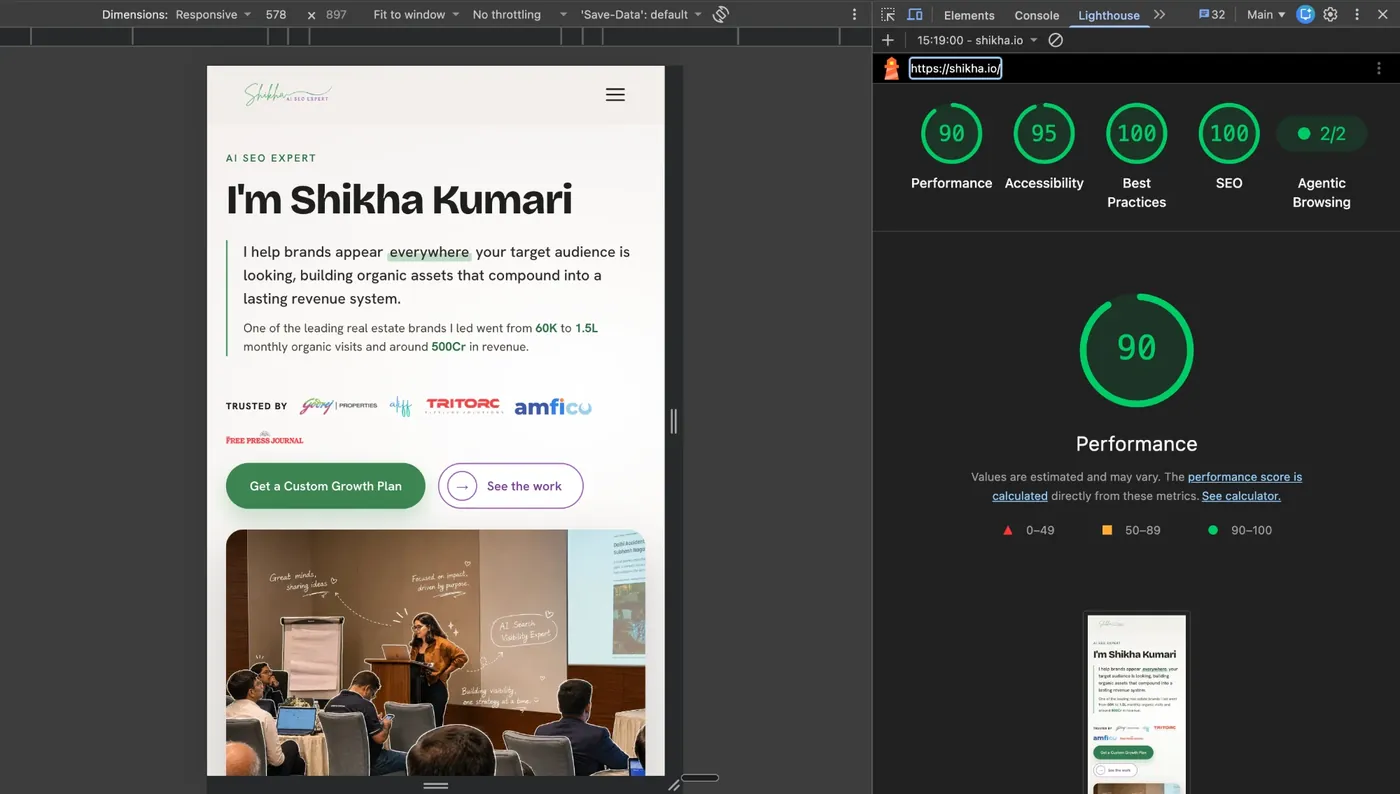
My 5 metric tiles, read with the plain-words guide above:
- First Contentful Paint (FCP): mine is 1.1 s.
- Largest Contentful Paint (LCP): mine is 3.6 s, still orange. More on this in Cause 3.
- Total Blocking Time (TBT): mine is 50 ms.
- Cumulative Layout Shift (CLS): mine is 0.001.
- Speed Index (SI): mine is 1.1 s.
Watch LCP and CLS more than the overall score. They are the 2 a visitor actually feels.
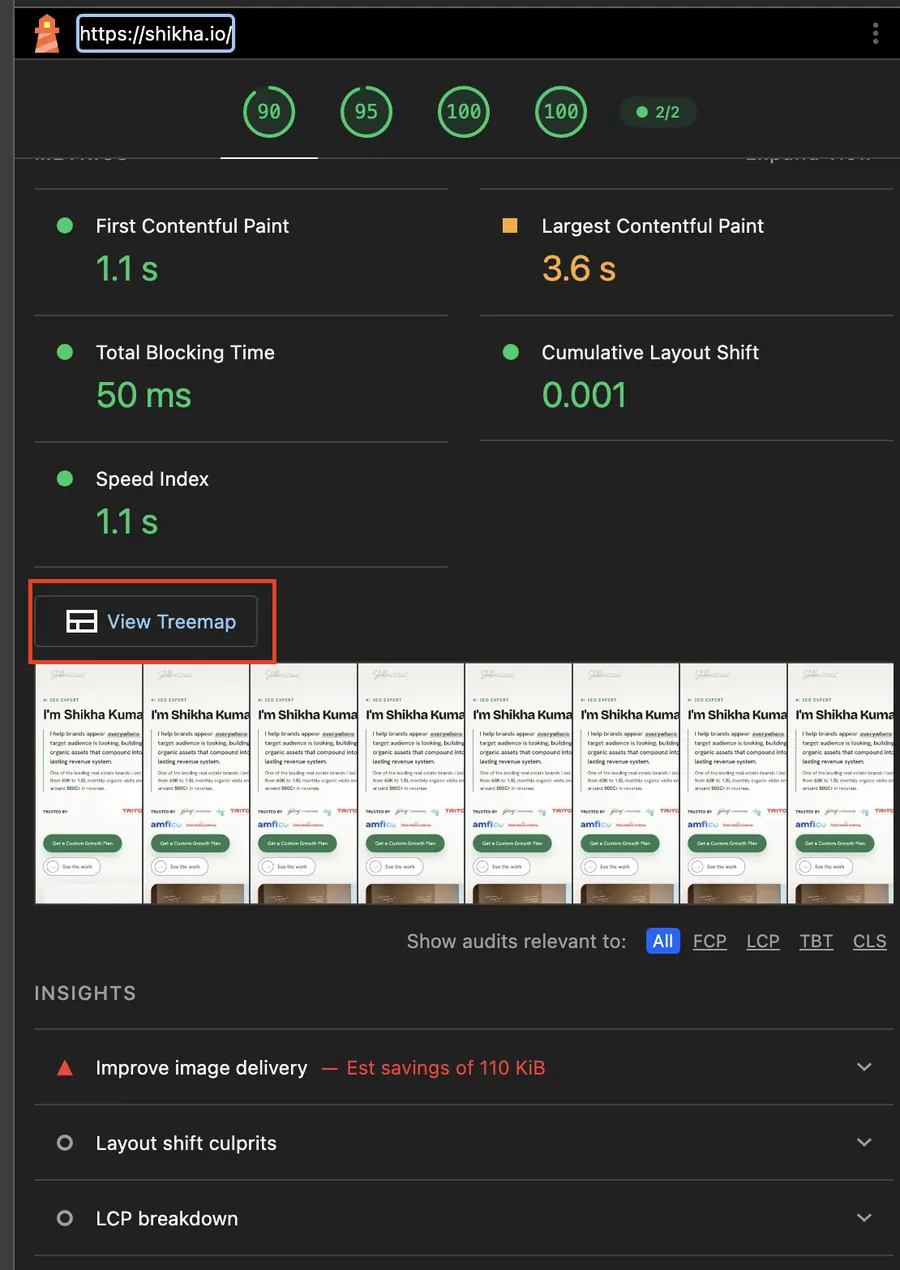
How to read a Lighthouse treemap (what all those blocks mean)
The treemap shows every piece of code your page makes a visitor download. Three rules are enough to read it:
- Each block is one file.
- A bigger block means more code to download and run.
- Blocks inside blocks mean that file is assembled from many smaller packages.
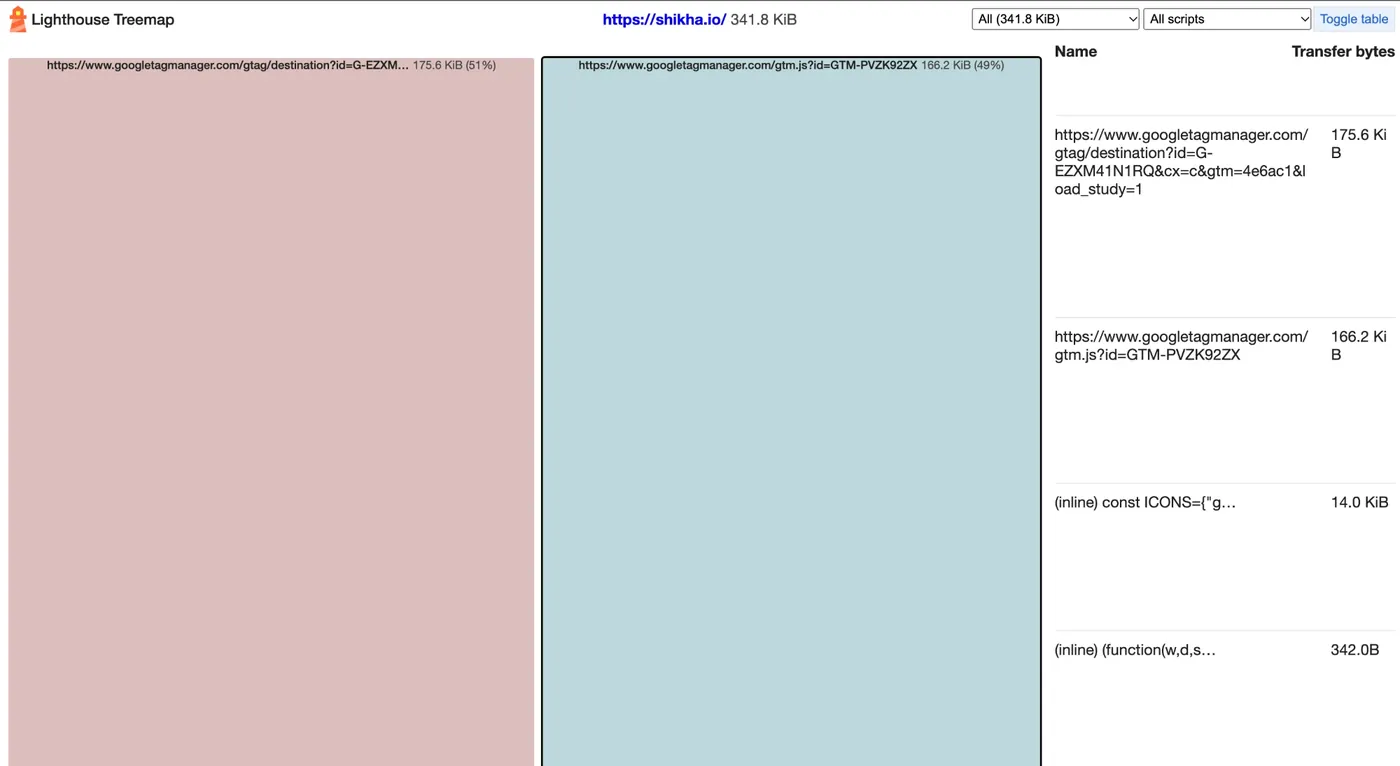
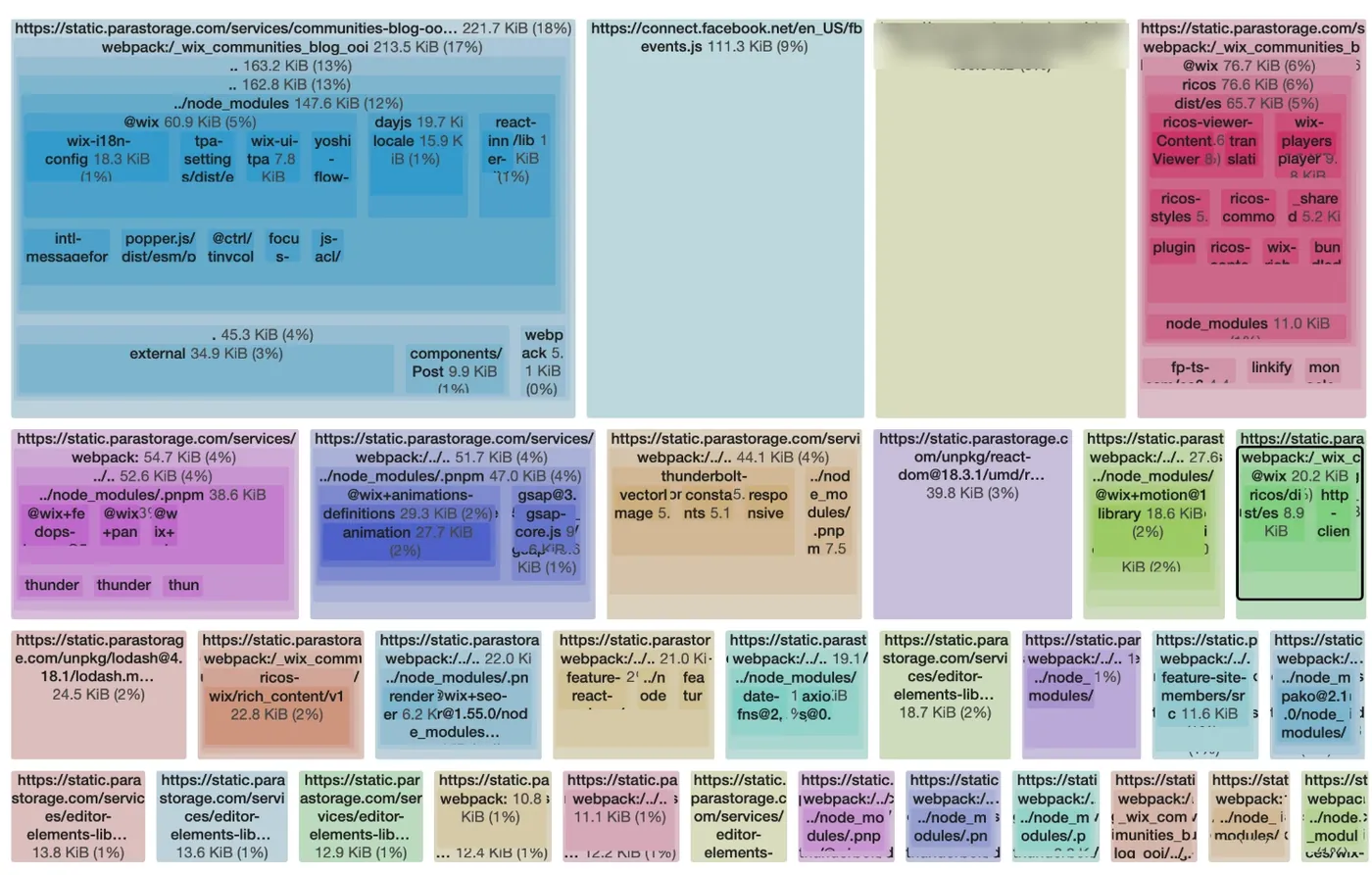
The second page makes every visitor download about 3.5 times more code than mine before they read a word. Most of it is not the blog post. It is the machinery around it.
How to act on it: start with the biggest block and ask one question. Does this earn its place? Tracking pixels, chat widgets and plugins installed once for a single feature are the usual suspects.
Cause 1: Images and fonts pasted inside your page code
This was the biggest problem on my site, and it is invisible unless you open the page code.
When I opened my homepage file, only 37 KB of it was the page itself: the words, the layout, the links. The other 1,658 KB was 41 images and 2 fonts converted into text, a format called base64, and pasted into the HTML.
AI page builders and some website builders do this because it keeps everything in one file. It has 3 costs:
- The browser reads the file top to bottom before it can show what comes later. My hero photo sat 421 KB deep.
- Nothing gets cached. A returning visitor downloads all of it again.
- Every image arrives at once, including the ones nobody scrolls to.
2-minute check: open your page, right-click, choose View Page Source, press Cmd+F and search for base64. If you find long blocks of random letters, your images are living inside your code.
The fix: move every image and font into its own file. My 41 images became separate files, and the 5 that appeared twice now load once. The page went from 1,695 KB to 73 KB.
Cause 2: Images bigger than the screen needs
The client logos on my homepage were stored 120 pixels tall and shown 21 pixels tall. Every visitor downloaded about 6 times the pixels they could see.
The rule: save each image at 2 to 3 times its displayed size. That stays sharp on high-resolution phones and laptops, and goes no bigger. Then convert it to WebP. Resizing and converting took my image weight from about 1.1 MB to 424 KB.
Cause 3: Your main image loads last (how to improve Largest Contentful Paint)
Largest Contentful Paint measures when the biggest thing on the first screen appears. On most founder websites, that is the hero photo.
Mine was a 191 KB JPEG, 1,400 pixels wide, buried 421 KB down the page file. On Lighthouse's mobile test it took 5,030 milliseconds to appear.
- Make 3 sizes, so phones get a small file: mine are 18 KB, 41 KB and 98 KB, and the browser picks the right one.
- Tell the browser to fetch it first, with a preload line in the page head.
- Set its width and height, so the space is reserved before it arrives.
In my desktop test, the hero now starts downloading at 0.34 seconds and is fully painted at 0.93 seconds.
Where I am honestly not done: on Lighthouse's slower mobile test my LCP is still 3.6 s, above Google's 2.5 s line, and Lighthouse flags 110 KB of image savings left. That is my next fix, and I will update this post with the result.
Cause 4: Does font affect page speed? Yes, here is by how much
Yes. Every font family and weight is a file the visitor downloads before the text looks right. Here is what mine cost, measured.
My 2 brand fonts were pasted into the page's styles as code, about 100 KB of it. Moved into their own files they are 41 KB and 35 KB, downloaded once and reused by every page on the site.
A myth worth retiring: you will still read that Google Fonts load instantly because visitors already have them cached from other websites. Since Chrome 86 in October 2020, every website gets its own cache. Your visitor downloads your fonts from scratch, wherever they are hosted.
- Use 2 font families at most. Each extra family or weight is another download.
- Use the WOFF2 format. It is the smallest.
- Host the files yourself and preload them, so they start downloading with the page.
I kept my brand fonts. They are part of how my site looks and sounds. The goal is not the fewest fonts. It is fonts that load without hurting the page.
Cause 5: Your page jumps while loading (how to fix Cumulative Layout Shift, CLS)
Fixing Cause 4 created a new problem.
While a font downloads, the browser shows a system font, then swaps. My brand font sits taller on each line, so when it arrived the whole page grew. On a phone it grew by 208 pixels, and anyone who landed on my contact form watched it slide down the screen. Lighthouse scored the shift at 0.236. Google's "good" CLS is 0.1 or less.
The common advice, font-display: swap, does not fix this. Swap is what causes the jump: it shows the fallback, then replaces it.
The fix is a fallback font reshaped to take up the same space as the brand font, using size and line-height overrides in CSS. The swap still happens. The lines no longer move.
| Screen width | Page movement before | After |
|---|---|---|
| 375 px phone | 208 px | 13 px |
| 412 px phone | 186 px | 41 px |
| 1,280 px desktop | 114 px | 21 px |
Setting a width and height on every image stops the other common jump, images pushing text down as they load. My homepage CLS is now 0.001.
Cause 6: Everything loads at once, even what nobody sees
My homepage has about 30 client logos and testimonial photos below the first screen. They all downloaded the moment the page opened.
Lazy loading tells the browser to fetch an image only when the visitor scrolls near it. It is one attribute: loading="lazy".
One exception: never lazy-load anything on the first screen, especially the hero image. That makes LCP worse.
Cause 7: Your hosting does not compress or cache
Hosting is usually the first thing people blame. On my site, hosting was not the main problem. The build was.
Two hosting settings still matter:
- Compression: my 73 KB homepage travels as 23 KB.
- Caching: images, fonts and icons are kept by the browser for a year, so returning visitors download them once.
2-minute check: right-click, Inspect, open the Network tab, reload, click your page and read the Response Headers. You want content-encoding (br or gzip), and a cache-control with a long max-age on your images.
I moved from Hostinger to Vercel because it does both by default and publishes every change in under a minute. Any good host can do the same.
Cause 8: Tracking scripts, and the trade-off I chose
Look back at my treemap. The 2 biggest blocks are Google Tag Manager and Google Analytics, about 342 KB of scripts.
There is a trick to make them disappear from the test: load tracking only after the visitor's first click or scroll. Lighthouse never clicks, so the score jumps.
I did not do it. Every visitor who reads without clicking would vanish from Analytics. I would be trading real data for a better-looking lab number. My homepage still scores 90 on mobile with tracking in place.
My rule: every script has to earn its place. Analytics earns it. A chat widget nobody uses, a pixel from an ad campaign that ended last year, or a plugin installed for one feature usually does not.
The before and after, in one table
| Cause | What I found | Fix | Result |
|---|---|---|---|
| 1. Assets inside the code | 41 images and 2 fonts in the HTML | Separate files | 1,695 KB to 73 KB |
| 2. Oversized images | Logos stored at 120 px, shown at 21 px | 3x display size, WebP | 1.1 MB to 424 KB |
| 3. Slow main image | 191 KB hero, 5,030 ms | 3 sizes plus preload | Painted at 0.93 s (desktop) |
| 4. Fonts | About 100 KB inside the page | 2 shared WOFF2 files, preloaded | 76 KB, downloaded once |
| 5. Layout jump | CLS 0.236 | Size-matched fallback fonts | CLS 0.001 |
| 6. Everything at once | About 30 off-screen images | Lazy loading | Load on scroll |
| 7. Hosting | No compression or long caching | Compression, 1-year cache | 23 KB over the wire |
| 8. Tracking | 342 KB of Google scripts | Kept, on purpose | Real visitor data intact |
Overall, Lighthouse performance on my contact-form view went from 54 to 82, and the homepage now scores 90 on mobile. SEO went from 92 to 100 and accessibility from 91 to 95.
Want this audit run on your site? Book a 30-minute site speed and visibility review.
Frequently asked questions
Does font affect page speed?
Yes. Every font family and weight is a file the visitor downloads before the text looks right, and a font swap can make the page jump. On my site, fonts added about 100 KB and a 0.236 layout shift until I fixed them.
Should I use base64 images on my website?
Only for tiny icons of a few kilobytes. Large base64 images bloat the page file, delay everything after them and cannot be cached. My homepage was 1,695 KB because of 41 of them.
Are Google Fonts cached across websites?
No, not since Chrome 86 in October 2020. Every website now has its own cache, so a visitor downloads your fonts on their first visit, wherever the fonts are hosted.
Why is my Lighthouse score different every time I test?
Browser extensions, network speed and your device all change the result. Test in an incognito window, in mobile mode, on the plain URL, and run it twice. One of my pages scored 87 in a normal window and 99 in incognito.
How fast should my website load?
Google's "good" thresholds are: Largest Contentful Paint within 2.5 seconds, Cumulative Layout Shift of 0.1 or less, and Interaction to Next Paint within 200 milliseconds.
Speed problems hide in how a page is built
None of this was visible by looking at my homepage. It looked finished. It was carrying 1.6 MB of weight nobody could see.
If your site was built quickly, by a builder, an agency on a deadline or an AI tool, run the 2-minute Lighthouse test in incognito before you spend another rupee on content. The foundation decides how far your content can go.
Posted in Search Everywhere Optimization
Want this audit on your site?
In 30 minutes I will look at how your site is built, what it is costing you in speed and search, and what to fix first. No pitch.
Book a 30-minute site speed and visibility review