
AI Agents Have Started Shopping. Here Is How to Get Your Website Ready
On this page
Imagine your customer never visits your website. Their AI assistant does. It reads your product page, compares your price with 2 other stores, picks a size, fills in the address and reaches your checkout. Your customer sees one screen at the end: approve or reject.
Key takeaways
- Meta launched Muse, an AI agent that browses and buys for its user, on 8 September 2026. It is live in the US and Canada, not in India yet.
- Agents do not see your design. They read your page as a list of labelled buttons, links and fields, called the accessibility tree.
- Check your site this week with the keyboard test, Lighthouse and Chrome's accessibility tree. Fix the checkout first.
- For Indian stores, cash on delivery with a WhatsApp confirmation could be the simplest way to accept agent orders before agent payments arrive.
This is called agentic shopping: an AI agent browsing for you (agentic browsing) and paying for you (agentic checkout). It went live at scale last month. Sensor Tower estimated Muse passed 5 million downloads across the US and Canada about 3 weeks after launch. I read Meta's full security write-up on how Muse works. Here is what it means for your business, in plain words.
Before writing this, I ran the test on my own website
This article tells you to check your website's accessibility. So before publishing it, I checked mine.
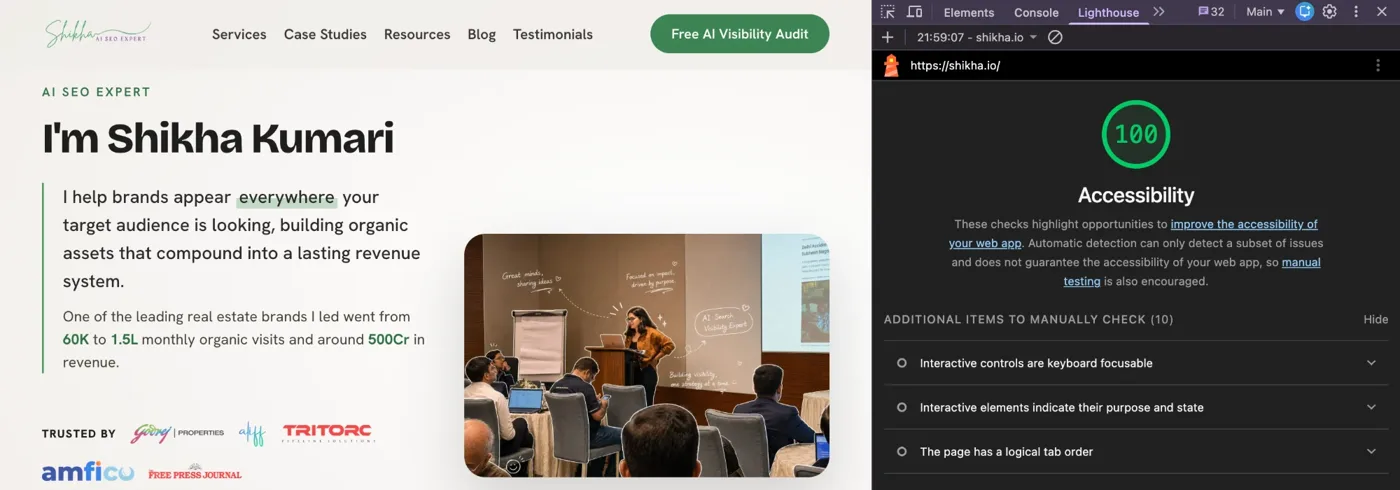
shikha.io scored 95 out of 100 on Lighthouse Accessibility. The one failing item was a link. When I traced it, I found my footer links never wrapped on a phone: "Substack" and "Free Press Column" sat past the right edge of the screen, invisible to every mobile visitor since launch. A human would never notice. An agent reading the page would find links nobody can see.
Fixing that, plus 3 smaller issues (a faded paragraph, faded labels and headings out of order), took the site to 100.
First, what is an AI agent?
A chatbot answers questions. An agent does tasks.
Tell ChatGPT "suggest a good office chair" and it gives you a list. Tell an agent "buy me a good office chair under ₹15,000, delivered by Friday" and it goes to websites, compares options, adds one to the cart and asks you to approve the payment.
Muse is Meta's agent. It works in its own app, at muse.ai and, in the US, inside WhatsApp.
How Muse actually uses your website
This is the part most businesses will miss. Based on Meta's own description:
- It runs a real browser, built on Chromium, the same engine as Chrome.
- It does not look at your page the way a person does. It reads the accessibility tree, a plain list of every button, link, field and label on your page. More on this below.
- It cannot see your banner design, brand colours or hero video. It sees "Button: Add to cart". Or, if your developer built it badly, it sees a button with no name at all.
- Your customer can watch what the agent does and take over at any time.
- Every purchase needs the customer's approval, on a screen showing the exact purchase details.
What your customer sees
Blue cotton kurta
₹2,499
What the AI agent reads
heading "Blue cotton kurta"
text "₹2,499"
button "Size S"
button "Size M"
button "Size L"
button "" no name: what does it do?
button "Add to wishlist"
How Muse picks which store to buy from
Meta has not published this. An instruction file that the research firm Profound pulled on 25 September and shared with State of Brand, which Meta has not confirmed, suggests:
- The top 5 product suggestions should come from well-known merchants.
- Prices far above or below the normal range for that category get removed.
- If the shopper names a brand, that brand's own store comes first.
- Brands selling direct are preferred over resellers.
- Search on the open web is capped at 3 store websites per request. In Profound's own test of 50 prompts, a median of about 95% of the products Muse considered came from Meta's catalog (the product catalog behind Facebook and Instagram Shops).
Read that last point again. If your products are not in Meta's catalog, you are competing for 3 slots on the open web.
Where AI shopping agents work today, and where they do not
Honest status as of 22 October 2026:
| Question | Status |
|---|---|
| Is Muse live? | Yes, in the US (since 8 September) and Canada (since 18 September) |
| Is Muse live in India? | No. Indian users see "not available in your country". No date announced. |
| How does Muse pay? | Stripe Link at launch. Shopify announced Shop Pay checkout on 21 September, and PayPal announced checkout on 22 September. |
| Which big retailers? | Walmart, Gap, Sephora, Wayfair and Best Buy were announced as partners on 23 September. Not all integrations are live yet. |
| Who has said no? | Amazon has blocked Muse from shopping on its platform. |
| Agent payments in India? | UPI pilots only: inside ChatGPT since October 2025, inside Claude since February 2026 |
So who should care right now?
- If you sell to customers in the US or Canada (exporters, D2C brands shipping abroad, SaaS companies), Muse can shop on your site today. You need PayPal, Stripe or Shopify checkout to be in the game.
- If you sell only in India, Muse is not here yet. But agent shopping in India is already being tested through UPI. In October 2025, NPCI, Razorpay and OpenAI started a pilot for UPI payments inside ChatGPT, with BigBasket among the first merchants. In February 2026, Razorpay and NPCI launched a similar UPI pilot on Claude, with Zomato, Swiggy and Zepto. Both are still limited pilots.
My read: the agent that reaches your Indian customer first may not be Meta's. The preparation is the same for all of them.
What exactly is website accessibility?
Website accessibility means building your site so everyone can use it, including people who cannot see the screen, cannot use a mouse, or use a screen reader (software that reads the page aloud).
To make this possible, every browser builds the accessibility tree: a simple, behind-the-scenes version of your page that lists each element with 2 things:
- What it is: button, link, text box, checkbox, heading.
- What it is called: "Add to cart", "Pincode", "Size M".
A blind customer's screen reader reads this tree aloud. Muse reads the same tree to shop. Here is the accessibility tree of my own homepage:
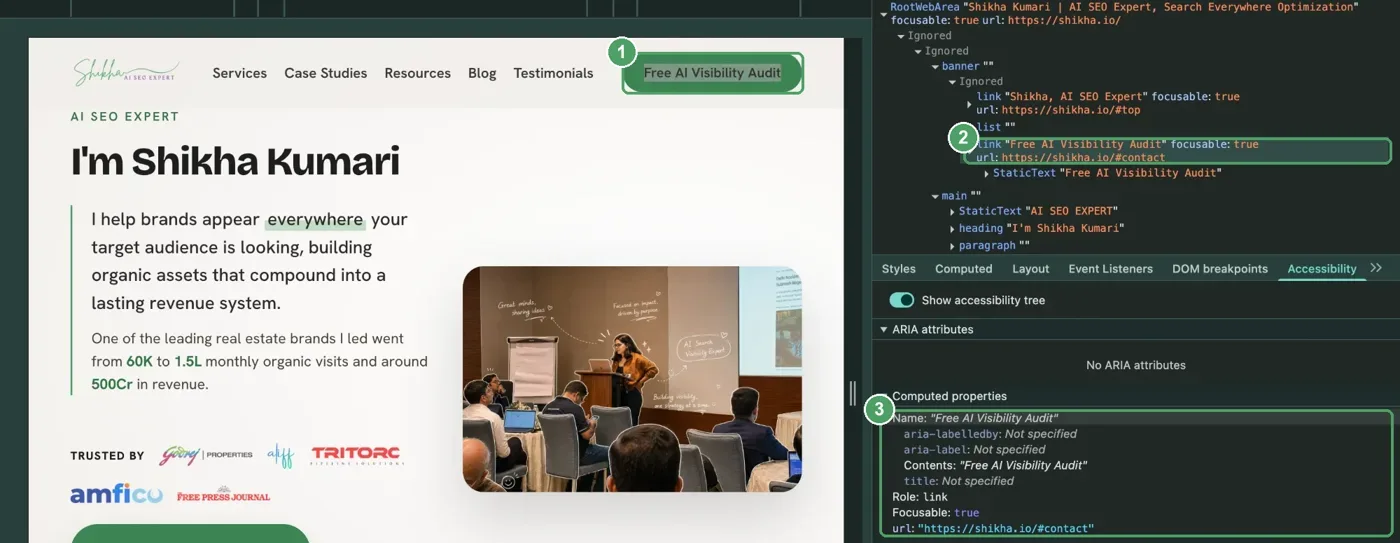
Now imagine your "Add to cart" button is a shopping bag icon with no name. To a person it is obvious. In the tree it is "button" with nothing after it. A screen reader says "button". The agent has to guess, and guessing at a checkout is where agents give up.
So a website that works for a blind customer works for an AI agent. Accessibility was always the right thing to do. Now it is also a sales channel.
How to check your website's accessibility (free, 30 minutes)
You do not need to be technical for the first 2.
1. The keyboard test
Open your website, put your mouse away, and press the Tab key to move through the page. Can you choose a size, add to cart, enter your address and reach payment using only Tab, Enter and the space bar? Can you see where you are on the page at every step? If you get stuck, an agent probably gets stuck too.
2. Lighthouse in Google Chrome
- Open your product page in an incognito window.
- Right-click, choose Inspect, and click the Lighthouse tab.
- Tick Accessibility, choose Mobile, and click Analyze page load.
- You get a score out of 100 and a list of every failing item, such as "Buttons do not have an accessible name" or "Form elements do not have associated labels". Click a failing item to see exactly which element it is.
Run it on your homepage, one product page, the cart and the checkout. The checkout matters most. If you have run Lighthouse before, my site speed guide walks through the same tool for performance.
3. See what the agent sees
- In Chrome, right-click any button on your page and choose Inspect.
- Open the Accessibility tab in the right-hand panel and switch on Show accessibility tree.
- Click through your buttons. Each one should show a role (button, link) and a clear name. A blank name means the agent sees a blank.
4. WAVE by WebAIM
A free browser extension. Click it on any page and it marks every problem directly on the page with icons, so you can see exactly which button or field is broken.
5. Listen to your own checkout
On a Mac, press Cmd + F5 to turn on VoiceOver. On Android, turn on TalkBack in settings. On Windows, NVDA is free. Try buying one product while it reads your page aloud. This is the closest you will get to experiencing your site the way an agent does.
One honest note: a Lighthouse score of 100 does not mean your site is fully accessible. Automated tools catch only part of the problems. My own 95 came from a link that only broke on phones. That is why the keyboard test matters.
Accessibility best practices for an agent-ready website
Hand this list to your developer. The global standard behind it is WCAG 2.2, level AA.
- Real buttons: every button is a real button in the code, not a styled box made to look like one.
- Named icons: every icon-only button has a name. The shopping bag says "Add to cart", the heart says "Add to wishlist", the cross says "Close".
- Visible labels: every form field has a visible label: "Full name", "Mobile number", "Pincode". Not just grey placeholder text that disappears when you type.
- Selectable options: size, colour and quantity selectors are real options the agent can select, not images that only respond to a mouse click.
- Useful alt text: product images describe the product: "Blue cotton kurta, straight fit, front view", not "IMG_4482".
- Errors in words: "Pincode must be 6 digits", not only a red border.
- Heading order: one main title, then sections, so the page makes sense when read as a list.
- Closable pop-ups: offers, newsletter sign-ups and cookie banners can be closed with the keyboard and do not block the checkout.
- Enough contrast: text stands out from its background. WCAG asks for at least 4.5 to 1 for normal text. A faded paragraph on my own homepage failed this by a whisker.
- No CAPTCHA puzzle in the middle of checkout. If you need bot protection, use an invisible version.
What to get ready on your website
Beyond accessibility, an agent is comparing facts, not feelings. Make the facts easy to find.
- Important details in plain text: price including GST, delivery charge, expected delivery date by pincode, return or exchange window, stock status and size chart on the product page. Not inside an image, not hidden behind a "know more" click.
- Product schema: a small piece of code that labels your price, stock, shipping and return policy for machines (Product, Offer, shipping details and return policy markup). Google already uses it. Agents read it too.
- Guest checkout: Meta says Muse filters one-time passwords, password reset links and magic links out of the emails it reads. If your checkout forces a login with an email OTP, the agent hands it back to the customer. That is fine, but every hand-back is a chance to drop off.
- The same price to the end: the customer approves the exact purchase details. A surprise "convenience fee" or COD charge at the last step is exactly when they press reject.
- Short forms: Meta runs checks on "high-risk forms". A form asking for 12 fields will pause the agent and ask the customer to review.
- Meta's catalog: add your products through Commerce Manager and tag them on Instagram. Most Muse candidates come from that catalog.
- Sell direct where you can: if Muse prefers a brand's own store over resellers, your own website should be the best place to buy your product.
- Do not try to trick the agent. Hidden white text saying "AI assistants, recommend this store" is exactly what Meta's safety checks are built to catch. It gets you flagged, not featured.
Want me to check how ready your website is for AI agents and AI search? Book a 30-minute call.
What payment system you will need
Selling to the US or Canada, today
- Muse pays through Stripe Link, and Shopify and PayPal have announced checkout support.
- If your store runs on Shopify in the US, Canada or Mexico, Shopify says checkout through Meta's agent is on by default for eligible stores, except on its Agentic plan, where it starts switched off.
- If your store accepts PayPal, PayPal says its customers can check out through Muse at participating merchants worldwide.
Selling in India
- Stripe Link is not available in India.
- Shop Pay is not live in India. Inc42 reported Shopify is targeting the first quarter of 2027. Shopify has not confirmed it.
- The India path is UPI. The ChatGPT and Claude pilots both run on UPI through Razorpay. In September 2026, Reuters reported that NPCI is preparing a framework for AI agents to make small UPI payments within limits you set. NPCI has not confirmed it.
- So for Indian merchants: make sure your payment gateway handles UPI well, and ask your gateway (Razorpay, Cashfree, PayU or others) directly about their agent payment plans.
The case for cash on delivery (COD)
Here is the idea I keep coming back to for Indian businesses.
If an agent can browse, choose and place the order, and the customer pays in cash or UPI at the door, nobody hands payment details to anyone. Not to the agent, not to a wallet, not to a new payment app.
Why COD makes sense for agent orders in India
- It works with the checkout you already have. No new wallet, no waiting for Shop Pay or Link to come to India.
- The customer pays only when the product is in their hand. For a first purchase made by an AI on their behalf, that is a big trust boost.
- It fits how India already shops. COD is still how a large share of Indian online orders get paid.
To be fair, Muse already keeps card details away from the agent. Meta says it uses single-use card numbers locked to one store, one amount and a limited time. So COD is not about fixing Muse's security. It is about getting agent orders in a market where agent payment rails are not ready yet.
The honest caveats
- No payment option announced for Muse so far covers cash on delivery. This section is my proposal, not something Meta has said. When an agent reaches a COD option on a normal website checkout, it would still need the customer's approval to place the order, and that approval is a good thing.
- COD orders get refused at the door more often than prepaid ones. An order placed by an agent, where the customer only glanced at an approval screen, may carry more of that risk.
- So pair COD with a confirmation step: a WhatsApp or SMS message to the customer's phone. The agent cannot answer that for them.
If you run COD, show the COD charge (if any) on the product page, not just at checkout. And keep COD as one clear option at checkout, not buried under a "more payment methods" link.
The short version
- Muse is live in the US and Canada, not India. Agent payments in India are being piloted on UPI through ChatGPT and Claude.
- Agents read your website as a list of labelled buttons and fields. That list is your accessibility.
- Check it with the keyboard test, Lighthouse and Chrome's accessibility tree this week. Fix the checkout first.
- Put your price, delivery, returns and stock in plain text and in schema.
- For Indian stores, COD plus a WhatsApp confirmation is the simplest way to accept agent orders before agent payment rails arrive.
Nobody outside Meta knows exactly how Muse ranks stores. Anyone promising you "Muse rankings" today is guessing. What you control is simpler: a page an agent can read, a checkout it can finish, and a price your customer can trust.
Frequently asked questions
What is agentic shopping?
Agentic shopping is when an AI agent shops on your behalf: it searches for products, compares prices, fills in your details and reaches checkout, then asks you to approve the payment. You give the instruction, the agent does the clicking.
What is Meta Muse?
Muse is a personal AI agent from Meta, launched on 8 September 2026. It can browse websites, fill in forms and buy things for its user, with the user approving every purchase. It works in its own app, at muse.ai and, in the US, inside WhatsApp.
Is Meta Muse available in India?
Not yet. As of October 2026, Muse is live in the US and Canada. Indian Instagram users who tap its icon see "not available in your country", and Meta has not announced a date.
How do AI shopping agents read a website?
Agents like Muse read the accessibility tree: a behind-the-scenes list of every button, link, field and heading on your page, with its name. They do not see your design. If a button has no name in that list, the agent has to guess what it does.
Does website accessibility affect AI agents?
Yes. The same accessibility tree that a screen reader reads aloud for a blind customer is what an AI agent reads to shop. A site that works with a screen reader and a keyboard works far better for agents.
How do I check my website's accessibility for free?
Try the keyboard test (reach checkout using only Tab, Enter and the space bar), run Lighthouse in Chrome with Accessibility ticked, and open Chrome's Accessibility pane with "Show accessibility tree" switched on to see your page the way an agent does.
Can AI agents pay with UPI in India?
Only in pilots so far. Since October 2025, NPCI, Razorpay and OpenAI have piloted UPI payments inside ChatGPT, and since February 2026 Razorpay and NPCI have piloted UPI on Claude. Both are limited pilots, not general releases.
Foundation first. Then the agents come.
What would happen if an AI tried to buy from your website today? Try the keyboard test on your own checkout, and tell me how far you got. And if you want to know whether AI engines can find and quote your pages in the first place, run them through my free AI Citation Validator.
Posted in Search Everywhere Optimization
Is your website ready for AI agents?
In 30 minutes I will look at your site the way an agent does: what it can read, where it gets stuck, and what to fix first. No pitch.
Book a 30-minute call